How to Edit a Video for Free: Beginner-Friendly Guide

Video content is around us these days. We see it on YouTube when we watch tutorials on TikTok when we watch clips in business presentations and in online courses. Videos are a good way to get a point across. Some people who are just starting out think that they need to spend a lot of money on special software have a lot of skills or own a super fast computer to edit videos. The good news is that this is not true anymore. If you want to know how to edit videos for free. Video editing for free is what we will be talking about. You will learn what video editing means when it is free which features are the important, how to edit a video step by step and how tools, like Picwand AI can make the editing process faster and easier.
Contents:
Part 1. What Is Free Video Editing
Free video editing is when you create or make videos better using software that's free to use. You can find free editors online. Some can also be downloaded to your computer or phone. In the past, free video editors had limitations. They often had watermarks or the video quality wasn't good when you exported it. Today many free tools can do a lot. Question like “how to edit my videos for free” can be solved. They have editing features. These are good for people just starting out students and those who create content. They are also good, for marketers and small businesses.
Free video editing usually includes things like:
- • Cutting unwanted parts from clips
- • Combining multiple video files
- • Adding transitions and effects
- • Inserting background music
- • Adding subtitles or captions
- • Adjusting colors and brightness
- • Exporting videos for social media platforms
Some modern video editors that use intelligence can do some really hard editing jobs for you. For example artificial intelligence video editors can remove the backgrounds from videos generate captions for you make the video quality better or automatically organize the clips for you.
Free video editing software usually falls into three groups:
Online Video Editors
These are editors that you can use in your web browser without having to install anything on your computer. They are really good, for projects and people who are just starting out with video editing.
Advantages:
- • No download required
- • Easy to access from different devices
- • Beginner-friendly interfaces
Disadvantages:
- • Internet connection required
- • Limited advanced editing functions
Desktop Video Editors
Desktop software usually offers more advanced tools and better performance for large projects.
Advantages:
- • More professional editing tools
- • Better export quality
- • Stable performance
Disadvantages:
- • Requires installation
- • May need stronger hardware
AI Video Editors
AI editors simplify editing by automating repetitive tasks.
Advantages:
- • Faster editing workflow
- • Automatic enhancement features
- • Easier for beginners
Disadvantages:
- • Some advanced AI features may require subscriptions
- • Less manual control in certain cases
Till now, your concern on how to edit a video for free can be addressed. Today people really like using platforms like Picwand AI because they make editing a lot and the results are still really good.
Part 2. Basic Features You Need in a Free Video Editor
When you are looking for a free video editor, you need to remember that they are not all the same. Some have tools than others. Before you pick one you should think about what features are really important to you and what you will actually use in a free video editor.
Here are how to edit a video for free and the most important features you should look for:
1. Video Trimming and Cutting
This is the most basic editing function. A good editor should let you remove mistakes, shorten clips, and rearrange scenes easily.
Without trimming tools, even simple editing becomes difficult.
2. Drag-and-Drop Timeline
A visual timeline makes editing much easier for beginners. You can quickly move clips, audio, text, and effects into place.
Simple interfaces save time and reduce frustration.
3. Text and Subtitle Tools
Subtitles improve accessibility and viewer engagement. Many users watch videos without sound, especially on social media.
AI subtitle generation is especially useful because it saves hours of manual work.
4. Audio Editing
Clear audio is essential for professional-looking videos. Useful audio features include:
- • Background music insertion
- • Noise reduction
- • Volume adjustment
- • Voice enhancement
5. Transitions and Effects
Transitions help clips flow smoothly. Effects can also improve visual quality and storytelling.
However, beginners should avoid overusing effects because excessive animations can make videos look unprofessional.
6. Export Without Watermarks
Some free editors place large watermarks on exported videos. This can negatively affect content quality and branding.
Always check export limitations before choosing a free editor.
7. AI-Powered Features
Modern AI features can dramatically speed up editing. Useful AI tools include:
- • Auto-caption generation
- • AI background removal
- • Video enhancement
- • AI filters
- • Smart scene detection
These features are especially valuable for beginners who lack editing experience, while seeking to enhance video quality.
8. Multi-Platform Compatibility
A good editor should work smoothly across:
- • Windows
- • Mac
- • Android
- • iPhone
- • Browsers
Cross-platform compatibility allows users to edit videos anywhere. Basically, the procedure of “how can you edit a video from YouTube” functions the same.
Part 3. How to Edit Videos for Free Step by Step
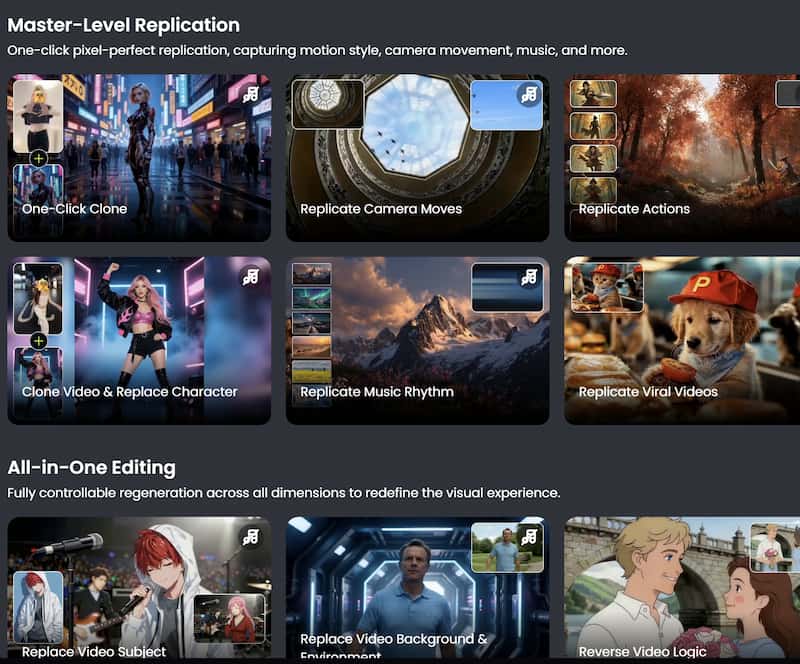
If you wonder is there an AI that can edit videos for you, Picwand AI is an excellent choice. Picwand AI Video Editor is an AI-powered editing tool designed for users who want fast and simple video enhancement. It allows users to add multiple creative elements without requiring professional editing skills.
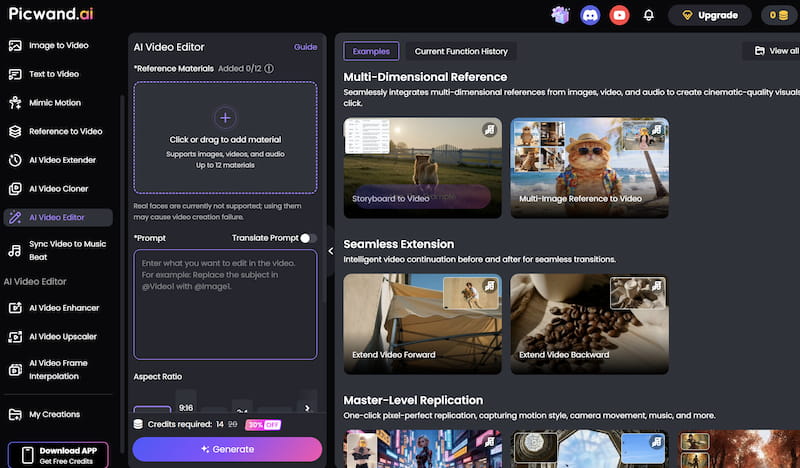
Use PicWand AI Video Editor for Free Smart Editing
Here is how to add elements to a video using PicWand AI Video Editor.
Step 1. Upload Your Video
Open the PicWand AI Video Editor website and Click or drag to add material. After uploading, the AI system will process the video automatically.
Step 2. Apply Visual Effects
Browse available AI filters and effects and choose the one you need.
Step 3. Preview and export the Final Video
After finishing the edits, export the video in your preferred resolution. Download the final video and share it directly on your preferred platforms.
Similar to video editor Kdenlive, Picwand AI video editor is pretty easy and convenient to use for both beginners and professionals.
Part 4. FAQs about How to Edit a Video For Free
Can I edit videos professionally for free?
Yes. Many free video editors now provide professional-level tools, especially for beginner and intermediate creators. AI-powered tools also help improve quality without advanced editing knowledge.
What is the easiest free video editor for beginners?
For people who are just starting out it is best to use a video editor that's easy to use and has tools that use artificial intelligence.
Do free video editors leave watermarks?
Some free editors add watermarks, while others do not. Always check export limitations before choosing software.
Conclusion
That’s all about how to edit videos for free. Learning how to edit a video for free is really easy nowadays. You can make videos without spending a lot of money on software or knowing a lot about editing. There are some editors that have powerful tools to help people who are just starting out. Some platforms, like Picwand AI Video Editor use intelligence to make editing faster by doing the hard work for you. If you want to make videos for YouTube or social media or even online lessons free video editing tools can help you make them look good and save you time and money. Video editing is a part of making videos for YouTube, social media and online tutorials and free video editing tools are a big help.
AI Picwand - Anyone Can be A Magician
Get Started for Free