Basic PlanVIP PlanVIP ExpiredPurchased credits are valid for life but require an active VIP subscription to use
0Credit(s)
You can use credits to access all the AI tools on Picwand, such as the AI Image Upscaler, AI Age Filter, AI Video Enhancer, AI Video Upscaler, AI Video Effects, and more.
Flux AI focuses on AI image generation, enabling users to turn text prompts into creative visuals quickly. Meanwhile, Picwand AI complements these results by providing powerful editing and enhancement tools to refine, adjust, and enhance the quality, resulting in a more polished, professional output.
When you search for an AI image generator online, you've come across Flux AI at least once. It's a newly launched tool that allows users to generate basic images from text prompts. While it's still building its reputation compared to more established platforms, it already offers enough features for creating detailed visuals. If you're interested in trying it but aren't sure how it actually works, don't worry, we've got you covered. In this post, we'll show you how to use Flux AI and explain what it offers. Additionally, we'll share advanced tips and tricks for image generation to help you get more accurate results from your prompts.
Flux AI, what is it? It's a new tool launched in 2024, which is why it hasn't quite hit the mainstream yet. Many people haven't explored it yet, but it doesn't mean it lacks capability. As the name suggests, Flux AI turns simple text prompts into high-quality images. You describe what you want, and the AI generates the visual for you.
Moreover, Flux supports everything from photorealistic images to anime, concept art, and more. It delivers both speed and control, allowing you to generate quick drafts or refine details like lighting, composition, and style for more polished results. If you're looking for a fresh alternative to the usual AI image generators, Flux is worth keeping an eye on.
• Flexible style support, from realistic images to artistic and stylized visuals.
• Supports prompts up to 1000 characters for more detailed image descriptions.
• Multiple in-house AI models: Flux Schnell, Flux Dev, Flux Pro, Flux 1.1 Pro, and Flux 1.1 Pro Ultra.
Pros
It produces highly detailed and photorealistic images.
It offers multiple models for different speed and quality needs.
It allows efficient iteration, making it easy to test multiple ideas fast.
It follows prompts accurately, including text placement inside images.
It supports high-resolution outputs, reaching up to 4MP or near-4K quality.
Cons
It can struggle with fine details in some outputs.
It does not always follow the style instructions perfectly.
It requires paid plans for higher-quality models and outputs.
It requires prompt tweaking to get consistent or accurate results.
It may produce inconsistent results depending on the model you use.
Part 2: How to Use Flux AI for Image Generation?
If you're wondering how to use Flux AI for free, the process is actually straightforward. Since Flux AI is a new AI image generator, many users are still getting familiar with its interface. However, creating high-quality images becomes easier once you master the basics. Below is a simple guide to help you get started.
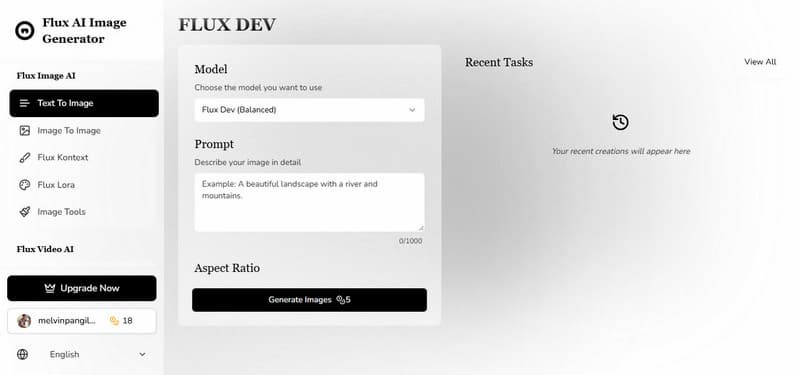
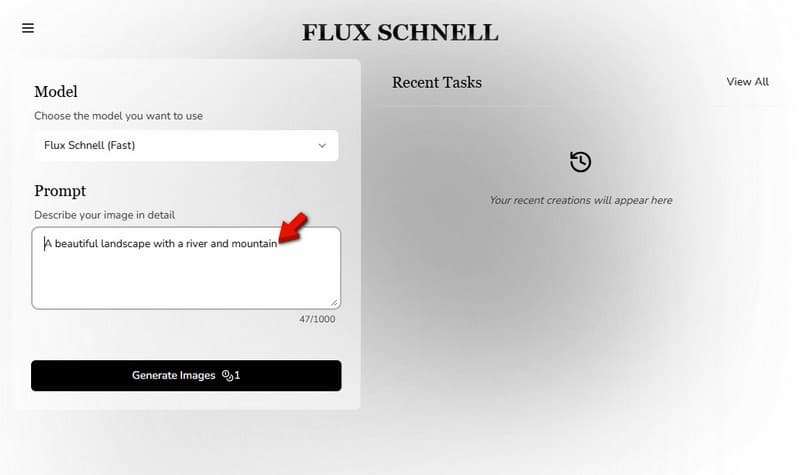
Step 1. On the Flux AI Image Generator homepage, select a model based on your needs. You can choose Flux Schnell for fast results or Flux Dev for balanced quality. In the Prompt box, type a clear description of the image you want. Remember, you can use up to 1000 characters.
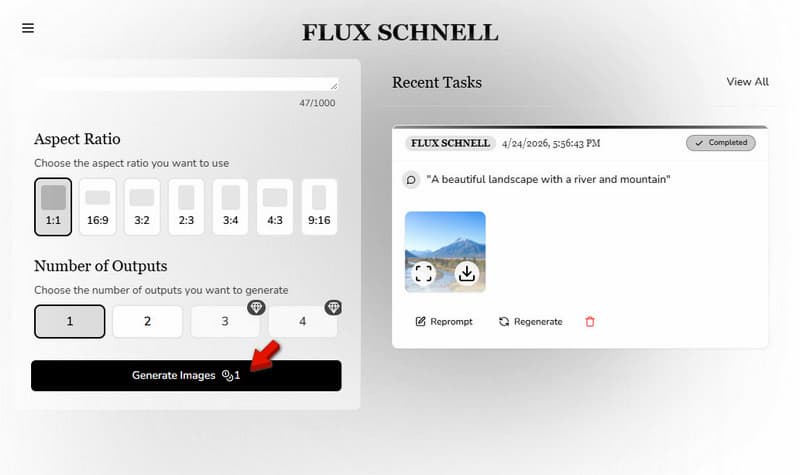
Step 2. Pick your preferred aspect ratio and set how many images you want to generate. Then, click the Generate Images button and wait a few seconds while Flux AI creates your images. After it creates images, you can regenerate them or download them directly to your device.
If you're just starting and exploring how to use Flux AI Image Generator, begin with simpler prompts and the faster models. Once you're comfortable, you can experiment with more advanced settings for higher-quality results.
Part 3: Advanced Tips and Tricks for Image Generation
After you get the basics of Flux AI, the real improvement comes from how you write AI prompts and control outputs. These tips can help you consistently get sharper, more realistic, and more usable results.
• Be specific in your prompts: Describe details like lighting, mood, camera angle, clothing, and environment.
• Use structured prompt formatting: Break your prompt into sections such as subject, style, lighting, background, and mood.
• Experiment with different Flux models: Use faster models for quick drafts, then switch to Flux Pro or Ultra for higher quality.
• Control composition with aspect ratios: Choose the right aspect ratio early to avoid cropping issues later.
• Generate multiple variations: Always generate 2-4 outputs per prompt.
Part 4: The Best Alternative to Flux AI: Picwand AI
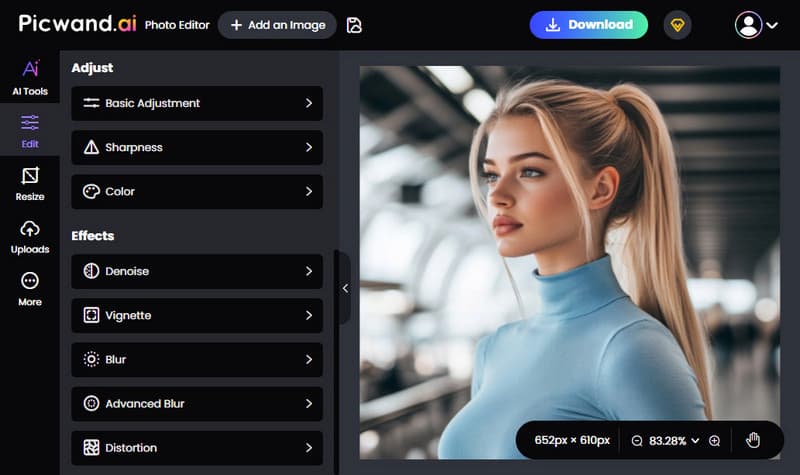
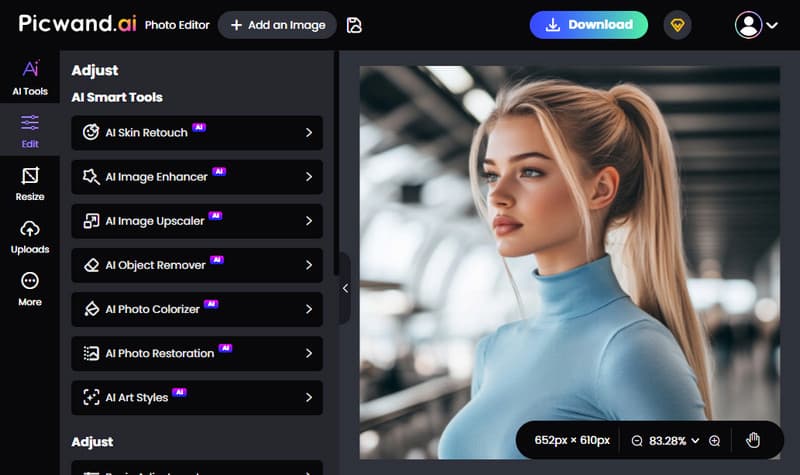
After learning how to use Flux AI, you might notice that it offers limited control when it comes to detailed editing. That's where alternatives like Picwand AI Photo Editor become useful. Unlike Flux AI, Picwand AI is more focused on photo editing. Picwand AI Photo Editor is packed with both basic editing tools and advanced smart features. It allows you to adjust brightness, contrast, sharpness (radius and intensity), and colors. You can also apply effects such as denoise, vignette, blur, advanced blur, and distortion for more creative results.
For composition control, it supports freeform cropping and preset ratios. It even includes lens correction tools for rotating and flipping images. Furthermore, Picwand AI Photo Editor includes AI-powered features. It includes skin retouch, image enhancer, upscaler, object remover, photo colorizer, photo restoration, and art style. After editing, you can export your work in JPG, PNG, or WebP formats at high image quality.
Why Choose Picwand AI Photo Editor:
• Supports basic photo adjustments and includes creative effects.
• Exports images in JPG, PNG, and WebP formats with high quality.
• Includes more than 10 AI smart editing tools for improving images.
• Flexible cropping with ratios like 1:1, 3:2, 2:3, 4:3, 3:4, 16:9, and 9:16.
My Verdict:
Picwand AI Photo Editor is a solid choice if you want more control after generating images. It stands out for its easy interface, fast processing, and strong AI enhancement tools that improve quality and details quickly. It is an all-in-one solution for refining and polishing AI-generated visuals.
Conclusion
Learning how to use Flux AI is a great first step if you want to explore AI image generation. It makes creating visuals simple, fast, and accessible. From choosing a model to writing prompts and generating images, Flux AI gives you everything you need to turn ideas into artwork. However, if you want more control over editing and refining your results, Flux AI alone may feel limited. That's where Picwand AI Photo Editor comes in. It complements Flux perfectly by offering powerful editing tools and AI enhancements to polish your images professionally.