Nano Banana Vs Imagen: In-Depth Review and Analysis

Nano Banana and Imagen are AI tools that generate high-quality images from text prompts. Nano Banana focuses on fast, flexible edits, and Imagen on realistic, precise outputs. Picwand AI Photo Editor complements them by offering full editing control, AI enhancements, and manual adjustments to refine and polish final images.
AI image generation has come a long way, and tools like Imagen and Nano Banana show just how fast things are evolving. Both models can turn simple text prompts into detailed visuals. However, they take slightly different approaches to interpreting and generating results. In this post, we'll break down Nano Banana vs Imagen across all key aspects. We'll look at their differences, real-world performance, pricing considerations, and the strengths and limitations of each tool. Along the way, we'll also introduce a powerful alternative for true, precise photo editing when AI-generated results alone aren't enough.
Contents:
What is Nano Banana?
Nano Banana is an advanced AI image generation and editing model from Google. It creates high-quality images with up to 4K resolution and with strong visual consistency. This AI model can both generate and edit images through text prompts. You can also adjust backgrounds, maintain character consistency, and even add accurate text within visuals.
What is Imagen?
Imagen is a text-to-image AI model developed by Google DeepMind. It converts natural language prompts into highly detailed, photorealistic, and stylistically varied images. It uses a technique called the diffusion model. Instead of pulling from existing images, it starts with random visual noise and gradually refines it, shaping it into an image that closely matches your prompt.
Key Differences Between Nano Banana and Imagen
When it comes to Imagen vs Nano Banana, the choice isn't as straightforward as picking the better tool. It depends on how you plan to use it. Both AI models come from Google, but they have slightly different priorities.
Performance in Real-World Use Cases
When you look beyond specs and into actual usage, the Google Imagen vs Nano Banana discussion becomes more practical. These tools behave differently depending on the task. Here's how they compare in real-world scenarios:
Choosing the Right Tool: Nano Banana vs Imagen
Picking between Nano Banana and Imagen comes down to how you like to work. Some projects need precision and polish from the start. Meanwhile, others benefit from speed, flexibility, and room to experiment. That difference is exactly where these tools separate.
When to Choose Nano Banana
- • You want to edit images using simple text prompts.
- • Speed matters; you need results in seconds, not minutes.
- • You’re creating social media content, mockups, or quick visuals.
- • You need consistent characters or subjects across multiple edits.
- • You like experimenting with different styles without having to rewrite complex prompts.
Note: Nano Banana, available through Gemini, feels more like a creative workspace than a one-shot generator.
When to Choose Imagen
- • You’re working on professional visuals.
- • You need highly detailed, photorealistic images.
- • You want clean, polished outputs in fewer attempts.
- • Your prompt must be followed closely and precisely.
- • You’re comfortable crafting structured, descriptive prompts.
Note: Imagen works best when you already know what you want and need it rendered accurately.
Pricing Analysis
Imagen 4:
Nano Banana:
Pros and Cons Overview
When comparing Nano Banana vs Imagen, it's easy to focus on features and forget what actually matters in day-to-day use. However, understanding both the strengths and the limitations helps you choose the right one.
Nano Banana:
Imagen:
Final Recommendation: Which AI Tool Should You Use?
Nano Banana is the better choice if your workflow depends on speed, flexibility, and frequent adjustments. It works well if you prefer experimenting with ideas, editing images through simple text prompts, and producing content quickly. It feels more like a creative workspace where you can refine outputs step by step until they match your idea.
In contrast, Imagen is best suited if you prioritize precision, realism, and high-quality final outputs. It performs strongly when given clear, detailed prompts and is ideal for professional use cases. Instead of focusing on editing flexibility, it emphasizes producing polished results in fewer attempts. If your goal is accuracy and visual consistency, it delivers more refined results.
Related Guides and Alternative
There are now many strong options beyond the most popular image generation tools. Some focus on cinematic quality, others on prompt accuracy, and a few are built for speed or workflow flexibility. Understanding these alternatives helps you choose the right platform depending on whether you care more about realism, control, or ease of use.
Best Alternative: Picwand AI
Both Imagen and Nano Banana are powerful in their own ways. However, both still fall short when it comes to true, detailed image editing. This is where Picwand AI Photo Editor becomes a strong alternative and a perfect companion to both tools.
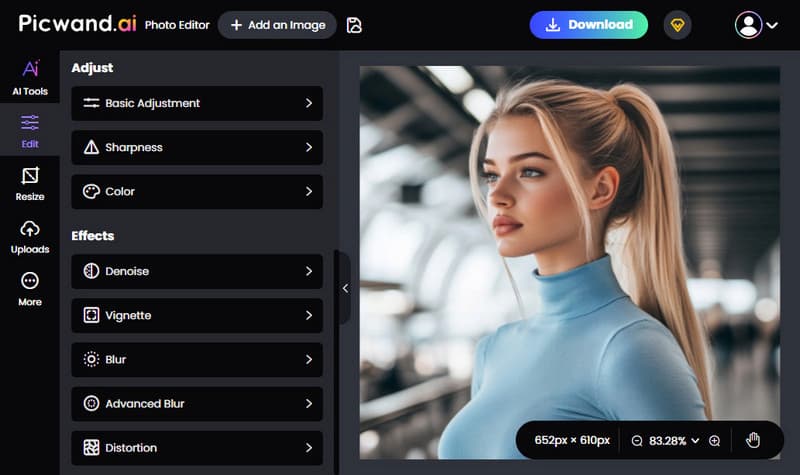
Picwand AI Photo Editor is a complete solution for real image editing, combining traditional editing tools with smart AI features. It includes essential adjustments for brightness, contrast, sharpness, and color controls. It also offers advanced effects such as denoise, vignette, blur, advanced blur, and distortion for more detailed image refinement. For cropping and layout, it supports multiple aspect ratios. You can also resize images by entering exact dimensions.
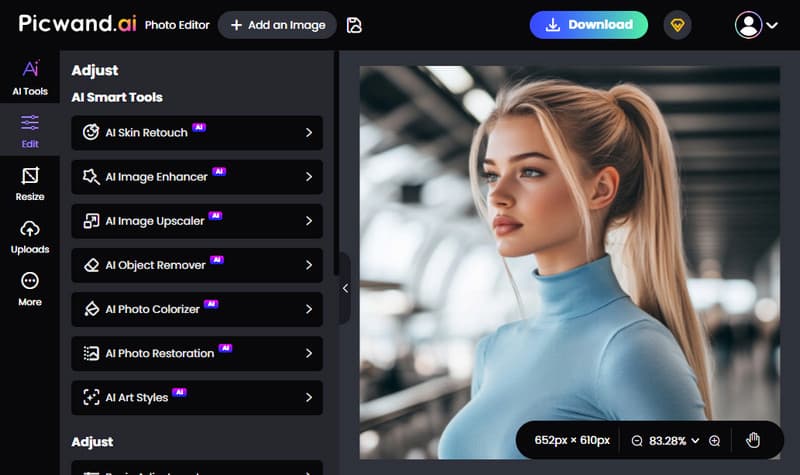
Beyond manual editing, it provides smart AI tools. It includes skin retouching, image enhancement, image upscaling, object removal, photo colorization, photo restoration, and artistic style transformation. These features help refine AI-generated images from tools like Imagen and Nano Banana into more polished, usable results. Notably, it supports exporting in JPG, PNG, and Web formats, with 4K resolution output.
Why Choose Picwand AI Photo Editor:
- • Offers 10+ AI-powered tools that go beyond standard manual editing features.
- • Exports images in JPG, PNG, and WEBP formats, with support for up to 4K resolution.
- • Supports multiple aspect ratios including 1:1, 3:2, 2:3, 4:3, 3:4, 16:9, 9:16, and freeform.
- • Provides photo adjustments with creative effects for basic and advanced editing needs.
My Verdict:
Imagen and Nano Banana are excellent for turning prompts into visuals and handling light edits, but they lack precise control. Pairing them with Picwand AI Photo Editor solves this gap, offering detailed adjustments, AI enhancements, and manual editing tools to refine images.
Conclusion
Nano Banana vs Imagen highlights two strong AI tools that excel at turning prompts into detailed visuals. Each has its own strengths in speed, realism, and creative flexibility. However, neither tool is fully designed for deep, precise photo editing. When your work requires fine adjustments, corrections, or professional-level refinement, an additional editing solution becomes essential. That's where Picwand AI Photo Editor comes in, helping you enhance, adjust, and perfect your images with both smart AI tools and manual controls.
AI Picwand - Anyone Can be A Magician
Get Started for Free